
Author: Michelle Brannan

  • Best Call Sheet Template: How to Create a Call Sheet for Your Production

    Best Call Sheet Template: How to Create a Call Sheet for Your Production

    If you’ve ever been on set, you know how crucial the call sheet is for everyone involved.

    As a shoot draws nearer, crew and agents alike are all over producers for this coveted guide. Everyone wants the goods for their call time (to plan for sleep), location (to plan for distance and travel), and all other details (to plan an outfit and general vibe) as they head into the big day. 

    Call sheets are the best baseline for communication, organization, safety, and details for the 

    whole crew. While you might have your call sheet system locked down, you might be here looking for a bit of guidance. 

    If that’s the case, LÜK Network is here to help with this review of some of the best call sheet templates and how to make a call sheet for a shoot.  

    What to Include on Your Call Sheet
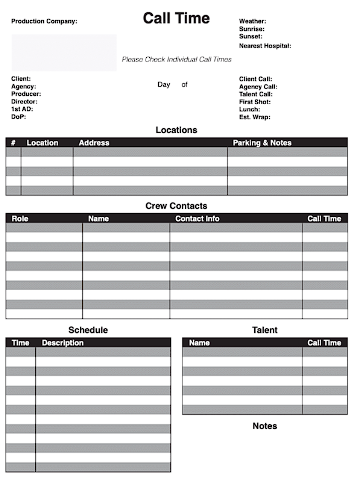
    Call sheet

    1. Production Title

    When naming your project, it’s best to choose a descriptive, keyword-rich, and consistent name for the shoot. Striking the balance between descriptive and concise is the best way to stay organized and easily find your project in the future.

    2. Date, Day of, & Call Time

    It’s crucial that the call sheet lists clearly and correctly when the shoot will be. Folks will refer to the call sheet leading up to and following the shoot for various reasons. 

    Accuracy is key!

    3. Location & Weather

    Location and weather must be listed for obvious reasons as well. People need to plan how they dress, when they leave, and get a bearing on all related details for their day ahead.

    4. Shooting Schedule (with Meal Times)

    People will refer to call sheets for the shooting schedule as you work through your day. Reasons to include this on your call sheet include, but are not limited to:

    • Time management: A shooting schedule helps the cast and crew plan their time and ensure they are prepared for the shots and scenes that will be filmed that day. It helps everyone stay on track and ensures that the production stays on schedule.
    • Coordination: A shooting schedule helps coordinate the various departments involved in the production, including the camera department, lighting department, and sound department. By outlining the order and timing of shots, each department can prepare for its part in production and ensure everything runs smoothly.
    • Efficiency: A shooting schedule helps the production run efficiently by ensuring that the cast and crew are prepared and ready for each shot or scene. This reduces downtime and ensures that everyone is focused and productive throughout the day. Not to mention, it makes for fewer questions directed to production when each team has access to the plan.
    • Communication: Including the shooting schedule on the call sheet ensures that everyone on the production team is aware of the plan for the day. This helps avoid confusion or miscommunication and ensures that everyone is on the same page.

    5. Cast/Talent

    Maybe the most important part! Including all names and relevant information is crucial for a handful of reasons. 

    • Contact information: The call sheet includes contact information for all members of the production team, including their name, position, and phone number. This allows members of the team to easily contact each other if there are any changes or updates to the schedule, or if anyone happens to be running late.
    • Role identification: Including every name and their role on the call sheet helps ensure that everyone on the team knows who is responsible for what. This helps avoid confusion and ensures that everyone is clear on their tasks and responsibilities.
    • Safety: Including every name on the call sheet is important for safety reasons. In the event of an emergency, it is important to have an accurate and up-to-date record of all individuals on set.
    • Legal reasons: In some cases, it may be necessary to have a record of who was present on set for legal reasons. Including every name on the call sheet helps ensure that there is a clear record of who was on set at any given time.

    Casting, Booking, & Payroll–Simplify Your Entire Production

    6. Crew List

    It’s important to include names, roles, and contact information for the crew for all the same reasons listed above. Be it role identification, phone numbers, or simple organization, you need to know the players involved in the day ahead.

    7. Contact Information

    Including contact information for all folks on a shoot allows members of the team to easily contact each other. It’s nice to have it all in one cohesive, tidy place leading up to the shoot, or to refer back to in the future

    8. Lodging & Travel Details

    Including lodging and travel details are crucial to ensure your team is well-prepared, arrives on time, and is comfortable and ready to work. It is an important logistical and communication tool to keep in one easily referable place. 

    It’s also important to include parking information to be sure everyone’s vehicles are parked safely and efficiently. This extra detail can help avoid confusion and ensure that everyone knows where to park and does so as quickly as possible.

    9. Extra Notes

    In addition to all the aforementioned details, call sheets are a great place to include any other important communication for your crew. This can include:

    • Sunrise and Sunset Times: This is helpful for planning for getting the most out of the light.
    • Props and Wardrobe: Including information about any props or wardrobe items that will be used during the shoot can help ensure that everyone is ready and available on set.
    • Special Instructions: If there are any special instructions or considerations for the shoot, such as using specific camera equipment or working around a particular lighting setup, these can be included on the call sheet to ensure that everyone is aware of them.
    • Safety Information: If there are any safety concerns or precautions that need to be taken during the shoot, such as working with hazardous materials or in challenging terrain, these should be included on the call sheet to ensure that everyone is aware of the risks and knows how to stay safe.

    Make Every Part Of Your Production Simpler

    Best Call Sheet Templates

    With a thick to-do list, you may find it tedious to organize and format every last detail into a presentable call sheet. It’s a lot! Thankfully, there are templates readily available to lend a hand.

    1. Boords

    boords logo

    Boords is a web-based platform that provides a simple, intuitive interface and allows teams to collaborate and streamline their production workflows. You can create a call sheet using Boords’ “Export” feature – select the “Call Sheet” option, choose your formatting preferences, and export the call sheet as a PDF.

    2. Google Sheets

    google sheets

    Google Sheets is another great web-based platform to use for making call sheets. You can fully customize your document, setting up columns for each of the categories you want to include (such as date, call time, location, cast, crew, and notes) and then entering the relevant information for each category. You can also use Google Sheets to format your call sheet, share it with your cast and crew, and update it as needed.

    3. Microsoft Excel & Word

    microsoft logo

    Both Microsoft Excel and Microsoft Word allow you to create tables and format them in a way that is similar to how you would create a call sheet in Google Sheets. You can fully customize your document, setting up columns for each of the categories you want to include (such as date, call time, location, cast, crew, and notes) and then entering the relevant information for each category. 

    Simply save it as a PDF and send it off as needed.

    4. Set Hero

    Set Hero logo

    SetHero is a web-based software that helps production teams manage and coordinate their projects. It includes a call sheet tool that allows you to create and distribute call sheets to your cast and crew. Conveniently, once you have created your call sheet in SetHero, you can easily distribute it to your cast and crew via email or the SetHero app. 

    SetHero also allows you to track who has received and confirmed their call time, as well as any changes or updates to the call sheet. This can help streamline communication and ensure all shoot details are handled in one comprehensive place.

    5. StudioBinder

    studiobinder logo

    Similar to SetHero, StudioBinder is a production management software that offers tools to help with scheduling, script breakdowns, shot lists, call sheets, and more. For Call Sheets, once you have filled out a template with all the necessary details, you can preview and share call sheets with your cast and crew via email or by downloading a PDF version. 

    StudioBinder also allows you to track who has received and confirmed their call time, as well as any changes or updates to the call sheet. It’s another great producer tool to keep your details in one place.

    Streamlined Casting, Booking, & Payroll: All in One

    Best Tips for Using Your Call Sheet Templates

    Call sheet templates

    Customize For Production Type

    While you may have your call sheet layout down pat, it can be fun or useful to customize each for a particular shoot. You can do so by adding or removing sections, changing the layout or design, and adding additional information specific to the shoot. 

    Back Up Your Call Sheets

    There are several ways to back up a call sheet and the best method will depend on your specific needs and preferences. By taking the time to back up your call sheet, you can ensure that you always have access to the information you need, even in the event of an unexpected issue. 

    Typically saving your call sheet in a cloud-based drive is the safest, although emailing yourself a copy works, too.

    Proofread Your Call Sheet

    For obvious reasons, you want your call sheet to be as accurate as possible for everyone involved. Take a glance and be sure it’s all squared away before sending off.

    Send in PDF Format

    Sending a call sheet in PDF format is best practice for a handful of reasons:

    • Compatibility: PDFs are easily opened on a variety of devices and operating systems, ensuring that everyone on the production team can access the call sheet regardless of their technology setup.
    • Formatting: PDFs preserve the formatting of the original document, which is important for ensuring that the call sheet is easy to read and understand. This can include details like fonts, colors, and layout.
    • Security: PDFs can be password-protected or encrypted to ensure that the information contained in the call sheet is secure and confidential.
    • Editing Prevention: PDFs can be created with editing restrictions that prevent unauthorized changes to the document. This can help ensure that the call sheet remains accurate and up-to-date throughout the production process.
    • Archiving: PDFs can be easily saved and archived for future reference, which can be useful for keeping track of production details and ensuring that all necessary information is available in case of any questions or issues that may arise.

    Use LÜK Network

    Producing a photo or video shoot is a major undertaking that calls for a dynamic array of tasks and skills. Effective organization and delegation to skilled team members are the only way to get the job done. In this way, for casting in particular, LÜK is your very best friend.

    Whether you’re looking for fresh faces, setting up cattle call go-sees, coordinating talent details, or simply trying to keep it all organized, we’ve got your back. There’s a tool and a pro available at the ready for just about any casting question or lift you might have.

    Streamline Your Production with LÜK Network

    As you ramp up for your next shoot and cobble a call sheet together, leaning on production tools can be a godsend in the time-saving department. While there are dozens of stellar tools for call sheet and shot list generation, there’s really just one for big-picture casting solutions…(It’s LÜK!) 

    If you’re trying to outsource busy work, save time, and reduce your back and forth when that call sheet is finally ready, you can lean on LÜK. We’re a casting cure-all and would be thrilled to lend a hand.

  • Best Shot List Templates: How to Create a Shot List for Your Next Production

    Best Shot List Templates: How to Create a Shot List for Your Next Production

    If you’ve ever been on set, you know how crucial it is to have a plan and effectively manage everyone’s time. With a room full of crew, an expensive location, and a long list of images to be shot, it’s vital that there be a blueprint in place to get it all done. If you’re new to the task of shot list creation–or are managing a new style of photo shoot–it may be hard to know where to begin. 

    As LÜK Network is here to help productions run right, we figured we’d chat through this topic in case you’re needing a touchstone. Let’s get to it.

    Why are Shot Lists Important?

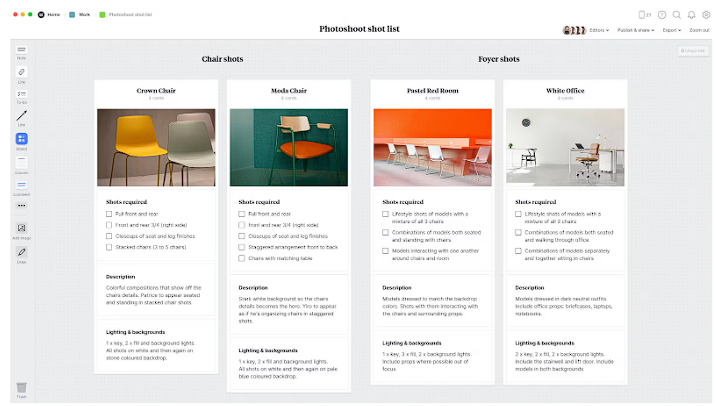
    A shot list is a detailed plan of each image you’re looking to shoot. It serves as a guide for the production team–providing a clear outline of the shots that need to be captured, their sequence, and all the particulars involved within that. 

    Having a clear and detailed shot list can help the production team plan and execute each shot efficiently, minimizing mistakes and reducing the overall production time and cost. It also helps ensure consistency and continuity between shots, which is important for creating a polished and cohesive final product. All in all, you just gotta have one. 

    When to Make a Shot List

    If you’re producing e-comm or find yourself producing any sort of project where products must have images associated with them, you’ll want to make a shot list. With a comprehensive idea of the task at hand, photographers, stylists, and all other crew will have a handle on the day ahead and what their deliverables are. 

    You will find that managing expectations and your allotted shoot time is far easier when all the folks involved have a plan.

    How to Make a Shot List

    Shot list image

    Scene

    If you’re creating a shot list for a narrative shoot, a “scene” would refer to a series of shots or frames that are set in a particular place. A scene usually involves a specific location, time, and characters or subjects. 

    Setup

    In a shot list, a “setup” refers to the preparation or arrangement of the camera, lighting, props, and any other technical aspect required to capture a specific shot or scene. A setup might mention the camera angle, framing, focus, aperture, and other camera settings, as well as the positioning and lighting of actors, props, and other objects within the frame.

    Within any given scene, there may be several “setups” involved to capture the images included therein. Each setup may be described in detail, including the type of shot (such as a close-up, medium shot, or wide shot), camera placement (such as a high angle or low angle), and any specific camera or lighting techniques that will be used.

    Shot

    In a shot list, a shot refers to a single continuous sequence of images captured by the camera without any breaks or cuts. Within that, each shot will be defined by the camera angle, camera movement, and framing of the subject within the image.

    Many different types of shots can be used in a shot list, including wide shots, medium shots, close-ups, and extreme close-ups. Each type of shot has a different effect on the viewer and can be used to convey different emotions, moods, or information. By creating a shot list with detailed shot descriptions, the production team can ensure that they capture all the necessary shots to tell the story as intended. 

    It also helps the director and cinematographer communicate their vision to the rest of the crew, making the whole production hum along as smoothly as possible.

    Equipment/Gear

    Each shot in the shot list may specify which equipment and gear is needed to capture the shot effectively, as well as any specific technical details required to operate the equipment. By listing all of the required equipment and gear in the shot list, the production team can ensure that they have everything they need on set to capture each shot according to the director’s vision.

    Movement

    In a shot list, “movement” generally refers to any type of camera movement that is planned for a particular shot. Camera movement can add visual interest to a shot, making a more dynamic experience of the intended result.

    Some common types of camera movement that may be listed in a shot list include:

    • Pan: A horizontal movement of the camera from side to side.
    • Tilt: A vertical movement of the camera up or down.
    • Dolly/Tracking: A movement of the camera toward or away from the subject, often along a track or on a wheeled platform.
    • Crane/Jib: A movement of the camera up or down, often from a high or low angle, using a crane or jib arm.
    • Steadicam: A smooth, fluid movement of the camera that follows the action, often using a specialized camera stabilizer.
    • Handheld: A shaky, handheld movement of the camera that creates a sense of immediacy and realism.

    The movement listed in a shot list may also include any specific details about how the camera will move, such as the speed or direction of the movement, and any other technical details required to achieve the desired effect.

    Angle

    In a shot list, “angle” refers to the position and orientation of the camera in relation to the subject being captured. The angle of the camera is a major part of how the final image is received.

    Many different types of camera angles can be listed in a shot list, including:

    High angle: The camera is positioned above the subject, looking down at it. This angle can make the subject appear smaller and less powerful.

    Low angle: The camera is positioned below the subject, looking up at it. This angle can make the subject appear larger and more powerful.

    Eye-level angle: The camera is positioned at the same level as the subject’s eyes. This angle can create a sense of intimacy and connection with the subject.

    Bird’s-eye view: The camera is positioned directly above the subject, looking straight down. This angle can create a sense of distance and detachment.

    Shot Size

    A shot size refers to the framing of the shot, or how much of the subject is visible within the frame of the camera. The shot size can have a significant impact on the visual composition of the shot and the mood or emotion that it conveys.

    There are many different types of shot sizes that may be listed in a shot list, including:

    • Extreme close-up (ECU): A shot that focuses on a small detail of the subject, such as an eye or a hand.
    • Close-up (CU): A shot that shows a part of the subject’s face or body, typically from the shoulders up.
    • Medium close-up (MCU): A shot that shows the subject from the chest up.
    • Medium shot (MS): A shot that shows the subject from the waist up.
    • Medium long shot (MLS): A shot that shows the subject from the knees up.
    • Long shot (LS): A shot that shows the subject in full, but at a distance.
    • Extreme long shot (ELS): A shot that shows the subject from a great distance, often including the surrounding environment.

    These choices are important as they relate to the creative vision as well as the planning and scheduling process at hand.

    Audio/Sound

    This would include the listing of any microphones, recorders, or any other audio equipment being used to capture sound.

    Lens

    This would refer to the type of lens being used, such as a wide-angle lens, standard lens, or telephoto lens. 

    Time

    Best to be as detailed as possible in shot list creation, especially when it comes to time. When you create your schedule, it’s important to bake in enough time to set up each shot and allow for enough time to capture the images intended. 

    Camera

    This would include the type of camera being used, such as a DSLR, mirrorless camera, or cinema camera.

    Cast/Talent

    A “cast/talent” refers to the models, performers, or actors who will be featured in each shot. This piece may include details such as which character is featured in the shot, what emotion or action they should be portraying, and any other specific requirements or instructions for the talent being shot.

    Best Shot List Templates

    Shot lists are… a lot! They must be detailed, comprehensive, and easy to follow. During the shoot day, printed versions become dogeared and noted to the “nth degree”. If you’re looking to save time on the formatting front, it’s best to have a hand in its creation. That’s where the pros come in:

    1. Adobe

    Adobe logo

    Adobe is a great tool for shot list creation and management. Within their creative software suite, Adobe Premiere Pro and Adobe After Effects can be used to create and manage shot lists.

    Shot lists can be created in Premiere Pro by using its timeline and sequence tools, which allow users to drag and drop clips onto a timeline and arrange them in an intended order. Users can also add details to each clip, including shot size, camera angle, and any other information they’d like to refer to.

    Shot lists can be created in After Effects by using its composition and layering tools, which allow users to organize clips and add details such as shot size and camera angle.

    2. Boords

    Boords logo

    Boords is an online storyboard tool that can be used to create shot lists. Within the product, you can add notes and comments to each shot as well as create storyboards, which all help to visualize each shot and communicate its visual style and mood to the rest of the team.

    3. Google Sheets

    Google Sheets logo

    Google Sheets provides a simple and flexible platform for creating shot lists, with the ability to customize the layout and formatting to suit your particular needs. Additionally, because Google Sheets is a cloud-based tool, it allows for easy collaboration and real-time updates among team members working on the same project.

    4. Microsoft Word or Excel

    Microsoft logo

    Microsoft Word and Excel provide flexible and customizable platforms for creating shot lists, with the ability to customize layout and formatting in whichever way you need. Because Microsoft Office is a widely used productivity suite, it is a simple and intuitive choice for collaboration and real-time updates among team members working on the same project.

    5. StudioBinder

    StudioBinder logo

    StudioBinder is a comprehensive producer’s platform conveniently equipped with a shot listing tool. There is a form you can fill out with all the needed details for each shot, including the shot number, shot description, shot size, camera angle, and any notes or instructions needed.

    6. Vimeo

    Vimeo logo

    While Vimeo does not provide built-in shot list creation functionality, it does have sorting abilities that allow for the organization of video footage, which can then be used to inform the shot list creation process. 

    Streamline Your Production with LÜK Network

    All in all, shot listing is one of the many tools that when used properly allows the more dynamic, creative parts of this work to take over. It is an essential blueprint that supports peace of mind for producers going into a big shoot.

    LÜK Network’s priority is to connect the best who with the best what: providing resources and connecting dots for producers. In that spirit, we hope this shot list guide will help ensure each producer’s creative vision and crew are properly elevated and supported. If casting on the other hand presents itself as an area in need of support, please give us a shout. 

    We’d love to take that off your plate, or at the very least, super charge that part of your work, too.